Toolbar |
|
|
|---|
Filter rules
| Filter the list of rules
| Add above
| Add new rule above the selected one
| Add below
| Add new rule below the selected one
| Duplicate
| Duplicate the selected rule
| Remove
| Remove the selected rule
| 
| Move the selected rule up in the list
| 
| Move the selected rule down in the list
|
|
Rule List | Sample replaceable frame 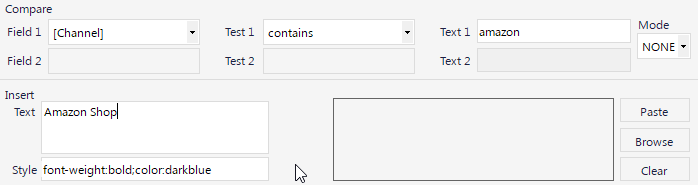 |
Compare | Field
|
|
|---|
Field 1
| Select the field to be compared from the drop-down list
| Test 1
| Select the test to match with the text in Text 1
| Text 1
| The text to be compared with the value of Field 1
| Mode
| None: Only the first condition will be valid.
And: Both condition 1 and comparison 2 must be true Or: Either condition 1 or condition 2 must match If the Mode is None, condition 2 fields will not be enabled..
| Field 2
| Select the field to be compared from the drop-down list
| Test 2
| Select the test to match with the text in Text 2
| Text 2
| The text to be compared with the value of Field 2
|
|
Insert | Tect
|
|
|---|
Text
| The text to be printed when the rule matches
| Style
| The CSS style to apply to the frame
| Paste
| Paste an image from the clipboard
| Browse
| Browse for an image to use for the current rule
| Clear
| Clear the current image from the rule
|
|
Rules are evaluated from the top down, the first rule to match will be applied.