Processing OrdersSyncing Records

Syncing between PCs
Packing Partner can synchronise data between multiple PCs and transfer records from one PC to another for processing. Only archive records are synced between PCs, current records are not automatically synced. They can be transferred manually to another PC.
Cloud drive
To use syncing you will need a shared cloud drive such as OneDrive or Google Drive, connected to all PCs that you want to sync.

Enabling folder syncing

In Packing Partner go to Tool>Settings>Syncing, choose a shared folder and enable syncing.
Folder sync settings
Settings


Enable folder syncing
Must be set to Yes for syncing to be active
PC Name
Name for each PC, it must be unique for each PC
PC Identifier
Identifier for each PC, it must be unique for each PC otherwise records can get overwritten when transferring.
Sync folder
The shared cloud folder used to copy files between all the synced PCs.

Transferring records

Transfer out
When records are transferred they are removed from current records on the source PC, and added to current records on the destination.
In the Records Tab select the records to be transferred, then click Records>Transfer Out. Select the PC to Send To from the toolbar and click Confirm.
Confirm transfer
Transfer in
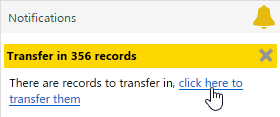
When the records have been synced to the other PC, there will be a notification, showing how many records there are to transfer in. You don't have to transfer records in before transferring more out, they will be added to existing records waiting to be transferred in.
Transfer in
If you aren't ready to transfer records in, you can click the cross on the notification, which will close the notification pane, but will remind you again in 5 minutes.

Troubleshooting

Sometimes shared folders do not share their files with all PCs. If this happens you may need to manually re sync the files using the control panel of your shared drive. Once the shared folders are synced again, Packing Partner will sync any backlog of records.
Syncing errors
When the sync drive is not syncing, please check the notification pane in Packing Partner, where you can see the times a PC was last synced with this one.
Last sync time
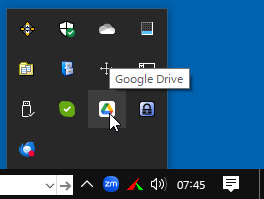
The control panel for most shared drives is accessed from the icon in the Windows notification area.
Cloud drive settings