Packing Partner overview and features
Packing Partner can process all your sales from all supported channels, including customisation details from channels that support them.
| Order Processing | |
|---|---|
Overview | Packing Partner can import sales from all sales channels, including custom channels, via scripting.
For the latest list of supported channels and carriers please see our main web site.
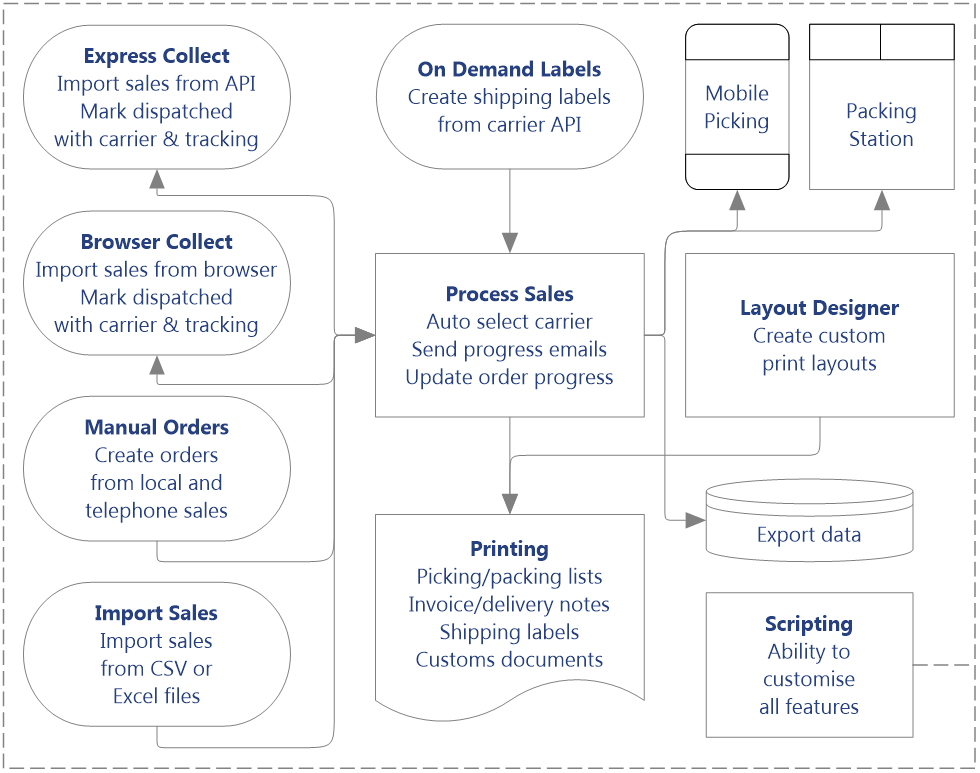 Order processing overview Packing Partner can import orders from multiple sources, create and print shipping labels from most UK carriers, directly to thermal label printer, or using a template, print onto integrated label paper.
Once orders are in Packing Partner, they are processed in exactly the same way, regardless of the channel they originated from.
User defined shipping rules and stored parcel metrics allow the majority of orders to have the correct carrier and service assigned automatically.
|
Sales sources | Express Collect
Express Collect is an additional paid subscription that uses our cloud server to gather sales 24 hours a day. The sales are automatically downloaded into Packing Partner, and transfered to be processed when you are ready for them.
Once sales have been processed, carrier details and tracking numbers are uploaded and the order is marked as despatched on your sales channel.
Express Collect has the advantage of not having to manually collect or import your orders, although not all channels are available to Express Collect as an API and credentials for your channel are required.
Browser Collect
Browser collect is the default way to collect orders into Packing Partner. It uses the familiar browser interface of your channel to select and collect orders.
Once your orders have been processed, they can be marked as despatched on your channel and carrier and tracking details uploaded. Again, by browsing to you sales channel in the Browser Tab, and clicking Mark Despatched.
All supported channels can be collected through the browser, including your own custom channel, which can be accessed via scripting.
The majority of channels supported by manual collect require API credentials, but orders from some older channels can be collected just by being logged in to your account.
Manual Orders
Form the Orders Tab, you can create orders that are processed in exactly the same way as all your other orders. They will have the same processing status, so can be marked printed, shipped and completed, the same as your other orders.
Import Sales
Orders can be imported from CSV, TAB, XLS, XLSX format files, using a template to save the import format. Different templates can be saved, so you can easily import from more than one order file type.
As with other sales sources, imported orders are processed in exactly the same way. If you channel supports it, you can export a file with carrier and tracking details to update the channel you have imported from.
|
Fulfilling Sales | Sales that are downloaded into the Express Tab, have a status of Ready as they are ready to be transferred into the Records Tab. Sales collected from the Browser Tab, go into the Records Tab, with a status of Collected.
Applying Shipping
user defined shipping rules are applied to all orders, so the majority of your orders will have the correct carrier and method applied automatically.
Optionally, stored metrics allow you to define the dimensions, weight and parcel type for a product once, then those same metrics will be used for all other orders with the same products.
You can also save pre-defined presets, so a dimensions, carrier and method can be applied to one or more orders by clicking a menu item.
Creating Shipping Labels
Shipping labels are created by connecting to the API of your carrier. They are downloaded directly into your orders, ready to be printed, and the details updated on your sales channel.
Printing Invoices and Labels
Packing Partner has a wide range of printing options, including picking and packing lists, postal records, customs details, including CN23 and commercial invoices. All of which can be customised using the built in scripting.
In the layout designer you can create layouts for all your other printing, including printing on thermal labels and integrated label sheets.
Mobile Picking and Packing Stations
Our Mobile Picking and Packing Station apps give you the most efficient and secure way to pick and pack your orders. Orders are sent from Packing Partner to the apps, where they are picked, packed and shipped, with the progress being reported to Packing Partner.
Notes to and from the picking and packing apps, allow you to communicate additional information and any issues that are found while orders are being fulfilled.
Mobile Picking is available on all mobile devices as a web application. The Packing Station is available on Windows 10 and above only.
Completing Orders
Once your orders have been fulfilled and are ready for shipping, the orders on your sales channel can be marked despatched and the carrier and tracking details updated. Once your sales channel has been updated, orders are marked completed, which is the end of the process.
|
Other Processes | Archive Records
All orders imported into Packing Partner, are automatically entered into the archive database. This can be searched to find previous orders. If you have Packing Partner installed on Multiple PCs, archive orders can be used for other purposes, such as to provide customer service information.
Multiple PCs
Packing Partner can be installed on more than one PC. Archive records can be shared across them all, using a shared cloud drive, such as OneDrive, Google Drive, DropBox, etc.
The current records database is not automatically shared between PCs. This provides isolation of orders on each PC. If you process thousands of orders, you can confine each PC to fulfil specific channels.
This is excellent for fulfilment houses, where orders for a small group of clients can be processed on different PCs, but still allows a central PC to have an overview of the process of all orders.
If you do want to process selected orders on another PC, current orders can be transferred manually by selecting them and clicking a menu item..
Notification Emails
Notification emails can automatically be sent directly to your customers, to notify them at each stage of your fulfilment process.
They can also be scheduled to be sent at a later date, so that you can for example, send out feedback reminder emails a week after their order has been shipped.
Scripting Support
Packing Partner's unique scripting allows any part of the program or order process to be customised to your exact needs. It can add menu items, modify existing functionality and provide functionality that doesn't exist in the program.
With a built in editor and debugger, it uses the VB.Net language to provide an easy to learn and understand, but extremely powerful, scripting environment.
|