Obtaining Credentials
Each channel and carrier that require credentials have different ways of obtaining them. This list shows how to obtain credentials from each channel and carrier supported by Packing Partner.
| Channels | |||||||||||||||||||||||
|---|---|---|---|---|---|---|---|---|---|---|---|---|---|---|---|---|---|---|---|---|---|---|---|
Amazon | All amazon credentials are obtained by logging in to the platform and authorising Packing Partner to access their API.
In the Credentials Dialog click Create>Channels>Amazon API or Create>Carriers>Amazon Shipping and follow the instructions.
Once you have allowed access, the account name and API token will automatically be entered into a new credentials entry.
| ||||||||||||||||||||||
B&Q | To create and copy the API key: goto User icon (top right)>Profile>API Key. B&Q, Debenhams and Superdrug, all use the Mirakl selling platform, so the API key is found in the same place.
B&Q API Key
 | ||||||||||||||||||||||
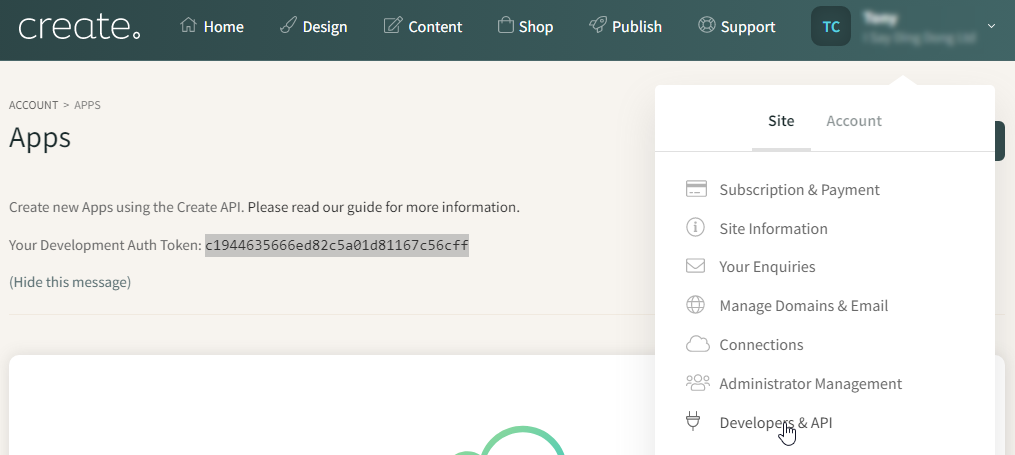
Create.Net | Click the account drop-down on the top right and click Developers & API. Highlight and copy the Auth Token into the Auth Token textbox in the Credentials Dialog.
Create.Net Auth Token
 | ||||||||||||||||||||||
Debenhams | To create and copy the API key: goto User icon (top right)>Profile>API Key. Debenhams, B&Q and Superdrug, all use the Mirakl selling platform, so the API key is found in the same place.
Debenhams API Key
| ||||||||||||||||||||||
eBay | eBay credentials are obtained by logging in to the platform and authorising Packing Partner to access their API.
In the credentials Dialog click Create>Channels>eBay API and follow the instructions.
Once you have allowed access, the account name, Site Id and Access Token will automatically be entered into a new credentials entry.
| ||||||||||||||||||||||
EKM | Create Application in EKM
To connect to EKM, you need to create an API Application in EKM from Features>API.
Click Create Application, name it Packing Partner and tick all the Application Permissions.
That will create an application and close the dialog. Click Details and copy the Access Token.
Create application to get access token
 Add Credentials to Packing Partner
In Packing Partner go to Tools>Credentials on the toolbar select Create>Channels>EKM API.
Paste the Access token copied from EKM, and enter the Account name. The account name is shown in blue on the drop-down on the top right orders EKM.
Click Verify on the credentials toolbar to ensure sure you have access to the EKM API, then you will be able to collect and update EKM orders.
EKM Account name in blue
 | ||||||||||||||||||||||
Etsy | Etsy credentials are obtained by logging in to the platform and authorising Packing Partner to access their API.
In the credentials Dialog click Create>Channels>Etsy API and follow the instructions.
Once you have allowed access, the Shop name, Shop Id and Refresh Token will automatically be entered into a new credentials entry.
| ||||||||||||||||||||||
OnBuy | Enable the OnBuy API
From the Listing menu at the top of your On Buy account, select Imports & Integrations
Imports & Integrations menu
 From the list of integrations, enable the OnBuy API
OnBuy API integration
 Once enabled, click the OnBuy API button to show the API credentials, and copy the Consumer Key and Consumer Secret into Packing Partner Credentials
API keys
 | ||||||||||||||||||||||
Shopify | Create an app with an API token
In Shopify, you need to create an app on your main login, which will provide the API token. Goto Settings>Apps and sales channels.
At the top of the page click Develop Apps, then Create an App.
Enter the name as Packing Partner, and follow the prompts to create the app.
Under the Configuration tab, set the following API access scopes:
Once you have ticked at the sextons for the access scopes, click on the API credentials tab and the copy button to get the token. Please store this in a safe place as Shopify do not allow you to see the token again.
Get token to paste in credentials
 Account name
The account name for the Credentials dialog is the one shown on the top right of Shopify.
Account name
 | ||||||||||||||||||||||
Superdrug | To create and copy the API key: goto User icon (top right)>Profile>API Key. Superdrug, Debenhams and B&Q, all use the Mirakl selling platform, so the API key is found in the same place.
Superdrug API Key
| ||||||||||||||||||||||
Tesco | In the Credentials Dialog click Create>Channels M-Z>Tesco API, then in your Tesco account click the user icon on the top right and select Personal Settings.
 In the API section, create and copy the API Key into the Tesco credentials. For the Account name is the same as Settings>Seller>Name, from the main menu on the left hand side.
| ||||||||||||||||||||||
TikTok | In the Credentials Dialog click Create>Channels>TikTok API, login and and follow the instructions to select the region, authorise and install. There is no actual install, this is just TikTok wording.
Select region
 Authorise
 Install
 | ||||||||||||||||||||||
Wix | In the Credentials dialog click Create>Channels>Wix, which will create a new Wix credentials entry. Once you've entered the credentials as detailed below, click Verify to ensure you have entered them correctly.
Credentials dialog
 Site name
The site name is the one shown on the top left of your Wix account.
Site name
 Site Id
The site Id is part of the web address for your account, copy the highlighted part below:
Site Id
 API Key
In Wix click the account drop-down on the top right, then API Keys from the left menu
API Key
 Follow the instructions to generate an API key, then paste the copied key into the credentials field.
Generated API key
 | ||||||||||||||||||||||
If you are using Amazon SFP labels through Packing Partner, you will also need to accept the T&Cs here.